
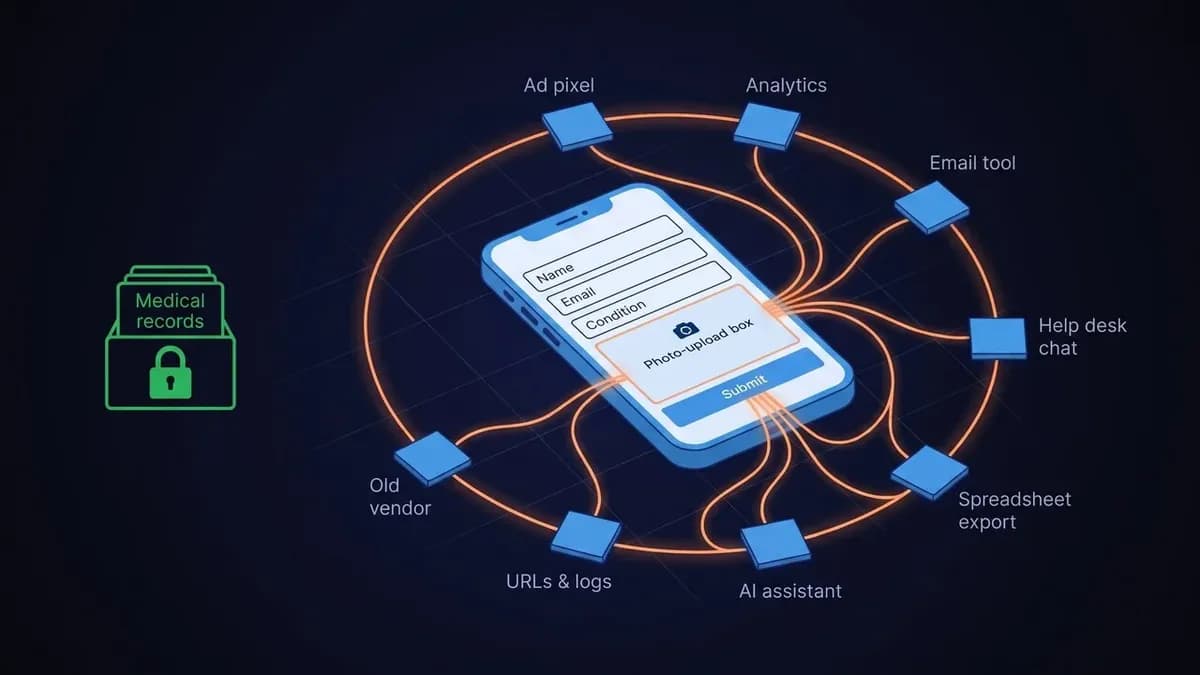
The system a telehealth company protects best is the one it thinks of as clinical. The medical record has a business associate agreement, access controls, and an audit log, and it is rarely where patient data leaks. The leaks come from the ordinary marketing and operations stack, the tools bought for growth and support, in places nobody labeled clinical.
That is the fact pattern in every federal action on telehealth data to date. On July 29, 2026, the FTC sued Hims & Hers over health information sent to Meta and Snap through website tracking tools and customer-list uploads, not over a breach of its records. The same was true of GoodRx, BetterHelp, and Cerebral before it. The record system held. The marketing stack talked.
In brief: PHI in a telehealth company rarely leaks from the medical record. It leaks from ad pixels and audience uploads, analytics, email and SMS tools, support transcripts, abandoned intakes, uploaded photos and IDs, exports, URLs and logs, former vendors, and AI assistants. Each has a way to check and a fix.
What follows is the ten places we find patient data in a telehealth company, how to check each one in an afternoon, and what a business associate agreement does and does not fix.
Why the rules now reach the marketing stack
Three rules make the marketing stack the exposure. The FTC's amended Health Breach Notification Rule, in effect since July 29, 2024, covers health apps and websites that HIPAA does not reach and treats an unauthorized disclosure, not only a hack, as a breach with a 60-day notice clock. HHS's guidance on tracking technologies treats a tracker that sends identifiable information to a vendor without a BAA as an impermissible disclosure on any authenticated page, which includes intake flows and portals. And Washington's My Health My Data Act, with close relatives in Nevada and Connecticut, requires separate consent to collect and to share consumer health data, and Washington lets patients sue.
The month-by-month record, with what to check for each action, is in our telehealth enforcement digest.
The ten places
1. Ad pixels and audience uploads
What leaks: the visit to a condition page, each step through the intake, and, with automatic matching turned on, the form fields themselves, sent to Meta, Google, TikTok, or Snap. A custom-audience upload sends a customer list, condition and all, on purpose.
How to check: open the site in a browser with developer tools, choose the Network tab, filter for facebook, doubleclick, tiktok, and snap, then load a condition page and step through the intake. Read what each request carries. In each ad account, open the audiences list and note every list that was uploaded and which column defined it.
The fix: no pixel on any condition page or intake step. Conversion measurement, if you need it, runs server-side through a vendor that signs a BAA and never receives a diagnosis. No list uploads that a condition defines. The advertising platforms do not sign BAAs for advertising, so no contract makes the pixel lawful.
2. Analytics
What leaks: page paths like /intake/acne or /glp-1/checkout, session recordings that capture keystrokes, user IDs, and IP addresses, on a vendor's servers. Analytics vendors generally do not sign BAAs for their standard products; ask yours in writing before assuming.
How to check: list every analytics and session-recording tool, then search each one for a condition name in page paths, events, and recordings. Check whether recordings mask form fields, and whether they run on intake pages at all.
The fix: analytics on infrastructure you own, so there is no third party to breach. No condition in a URL. Recordings masked, or off on intake.
3. Email and SMS platforms
What leaks: profile properties and tags such as condition, medication, and refill date, plus the message history itself. The vendor holds all of it.
How to check: open a patient profile in the lifecycle tool and read the properties. Ask the vendor in writing whether your plan includes a BAA. Many do not offer one, and some offer it only on enterprise tiers.
The fix: a BAA-covered vendor or self-hosted lifecycle messaging. Segments defined by non-clinical attributes. Nothing clinical in a tag.
4. CRM, help desk, and chat
What leaks: patients describe symptoms, doses, and side effects in free text to support, and the transcript lives in a tool that was bought for sales.
How to check: search tickets and chat logs for words like rash, dose, missed, pregnant, and refill, and count the matches. Then check whether your plan tier includes a BAA.
The fix: a BAA-covered plan, or a support channel inside the platform. Retention limits on transcripts. A redaction rule for anything that crosses into a tool that is not covered.
5. Abandoned intakes
What leaks: screeners that were started and never finished still hold a name, an email, and answers about the person's body, for as long as the tool keeps them.
How to check: ask where partial submissions live (the form tool, your platform, your database), how many there are, and the date of the oldest.
The fix: a published retention period, a purge that runs by itself, and a way for a person to ask for hers to be deleted. If your intake vendor keeps part-finished intakes on its side, its retention caps yours, so ask for the number.
6. Uploaded photos and identity documents
What leaks: skin photos and government IDs collected for verification, sitting in upload widgets, cloud buckets, and support attachments long after the verification is done.
How to check: list every place an upload can land. Check bucket access rules and lifecycle settings. Check whether the ID is still stored after the verifier returns its result.
The fix: pass documents through to the verifier and keep only the reference number. Private buckets with expiry. No attachments in email or help-desk threads.
7. Exports and spreadsheets
What leaks: the CSV someone pulled for a board meeting or a cohort analysis, in a shared drive, sometimes with link sharing on.
How to check: search shared drives for spreadsheets with patient columns, and read the sharing settings on each.
The fix: an export policy with expiry. Reporting through a tool under BAA. De-identify before analysis.
8. URLs and logs
What leaks: identifiers, tokens, and conditions in query strings and paths are copied into every analytics tool, CDN log, and server log that sees the request. A booking link with a token in its path is a common example.
How to check: read one day of server and CDN logs for /intake, /booking, and any query parameter that looks like an identifier.
The fix: identifiers in request bodies, not URLs. Opaque IDs. Known patterns redacted at log ingest.
9. Former vendors
What leaks: the tool you switched away from still holds what you gave it, and the return-or-destroy clause in its BAA was never exercised.
How to check: list every vendor of the last three years and find the deletion confirmation for each.
The fix: an offboarding checklist that ends with a written deletion confirmation.
10. AI assistants
What leaks: a staff member pastes a patient's message into a consumer chatbot to draft a reply. The message is now on that vendor's servers under that vendor's consumer terms.
How to check: ask, and check browser histories if your policy allows it. Consumer tiers of the major assistants do not come with a BAA.
The fix: a written policy, an approved assistant on a business tier that signs a BAA, and nothing clinical in a consumer tool.
What a BAA does and does not do
A business associate agreement makes a vendor accountable for the PHI it handles on your behalf. It is necessary for every vendor on the list above that receives patient data. It is not sufficient.
A BAA does not authorize a use that HIPAA says the patient must authorize, such as marketing, and the advertising platforms do not sign one. It does not shorten retention, mask a recording, or delete an export. A BAA is the paperwork that makes a data flow permissible. The engineering decides whether the flow exists.
The hygiene list
- Inventory every place patient data flows, not only where it is stored. The proposed Security Rule would require this map; build it now.
- No tracker on any intake page or condition page unless a BAA covers the path.
- A published retention period for abandoned intakes, uploads, and exports, and a purge that runs by itself.
- Identity documents pass through to the verifier; you keep the reference number.
- Analytics and lifecycle messaging on infrastructure you own.
- A signed BAA with every vendor that remains.
- All of it written down, because after an incident the question is whether the disclosure was authorized, not whether you were hacked.
This is the inventory the telehealth practice's compliance audit starts with. If you would rather do it yourself, the ten checks above take an afternoon, and the network tab is free.
This article describes where patient data commonly ends up and how to check for it. It is general information, current as of the date above, and it is not legal advice or a substitute for a HIPAA risk analysis performed for your organization. Igility is not a law firm, and reading this does not create an attorney-client relationship. Do not act on this, or decide not to act, without advice for your own situation. Whether a specific disclosure is permitted depends on your facts, your agreements, and the states where you operate, and that question belongs to your privacy officer and counsel. We build the systems that make the answer easier to give.
References
- FTC — FTC and States Act Against Hims & Hers for Deceptive and Unlawful Privacy Practices, July 29, 2026; GoodRx, February 1, 2023; BetterHelp, March 2, 2023; Cerebral, April 15, 2024.
- FTC Health Breach Notification Rule — final rule announcement, April 26, 2024; Federal Register, May 30, 2024, effective July 29, 2024.
- HHS Office for Civil Rights — Use of Online Tracking Technologies by HIPAA Covered Entities and Business Associates, updated March 18, 2024; American Hospital Association v. Becerra, N.D. Tex., June 20, 2024.
- HHS — HIPAA Security Rule notice of proposed rulemaking, Federal Register, January 6, 2025, including the proposed asset inventory and data map.
- Washington My Health My Data Act — Maxwell v. Amazon, filed February 10, 2025 (Orrick). Nevada SB 370 and Connecticut SB 3.